Env Var Detective · for VS Code, Cursor, VSCodium and Windsurf
Never crash on a missing env var nobody documented again.
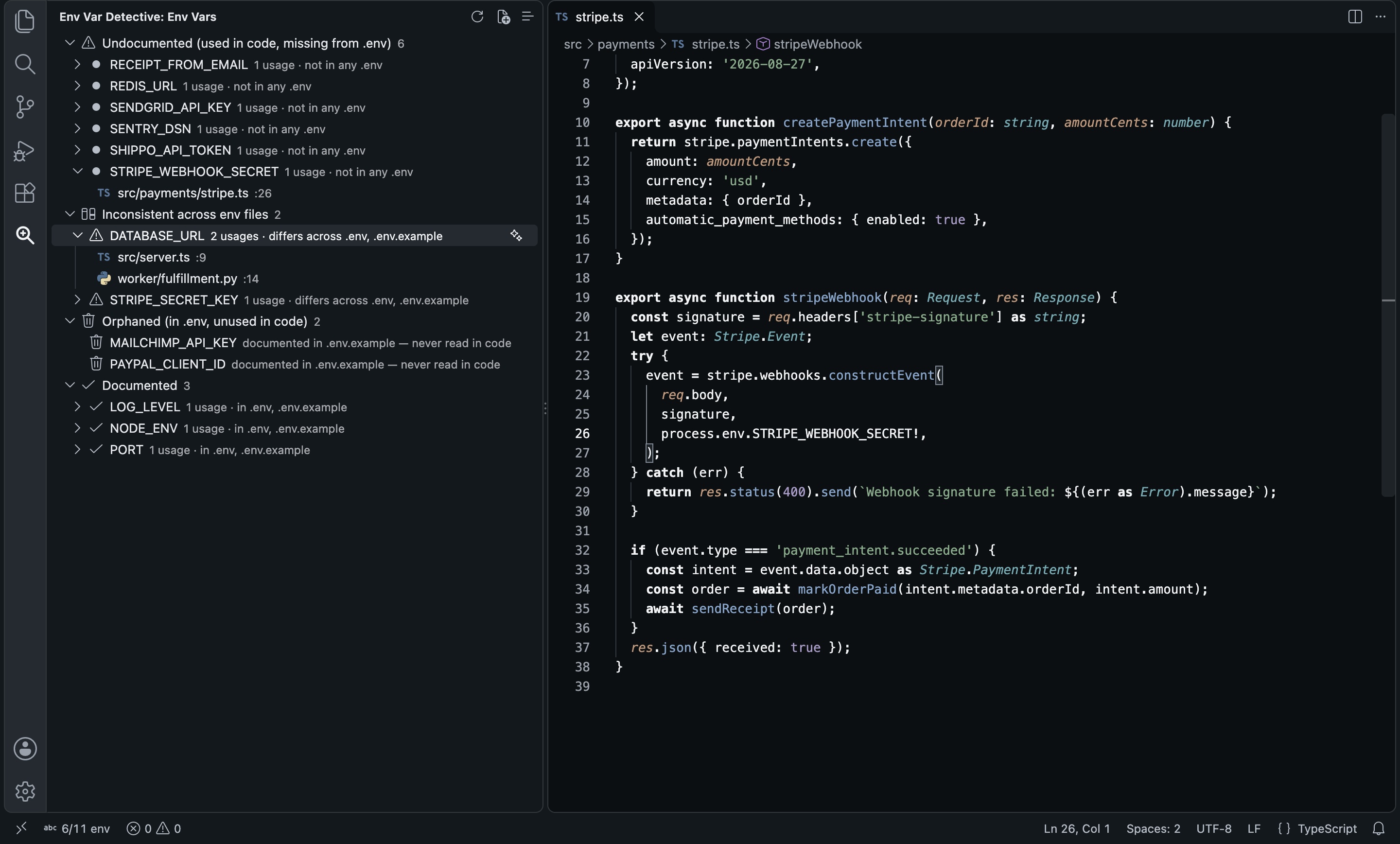
Every process.env.X and os.getenv("X") in your code, checked against your .env files and sorted into undocumented, inconsistent, orphaned and fine. One click, and the missing .env.example entries are written with a comment and a safe placeholder.
VS Code Marketplace · Open VSX for Cursor, VSCodium and Windsurf
Why I built it
The .env.example is always a year behind the code
Every time I joined a new repo, the same dance: clone, install, run, crash on a missing STRIPE_WEBHOOK_SECRET, grep for process.env, ask in Slack, repeat. Half the keys the example listed were dead, and the ones that mattered were missing.
So I built the side bar I wanted. It reads every env var your code actually reads, in TypeScript, Python, Rust, Java and more, and puts each one in a bucket. Click a variable to land on every line that reads it.
Ciro Cesar Maciel, who builds and maintains it
How it works
From a new repo to a correct .env.example
1
Install
Open the Env Var Detective icon in the Activity Bar. The scan is already done. No key needed.
2
Read the buckets
Undocumented, inconsistent across files, defined but never read, documented.
3
Jump to the code
Expand a variable and click a file to land on the line that reads it.
4
Write the docs
Generate .env.example with AI drafts every missing entry. Append only when you click.
See it in action
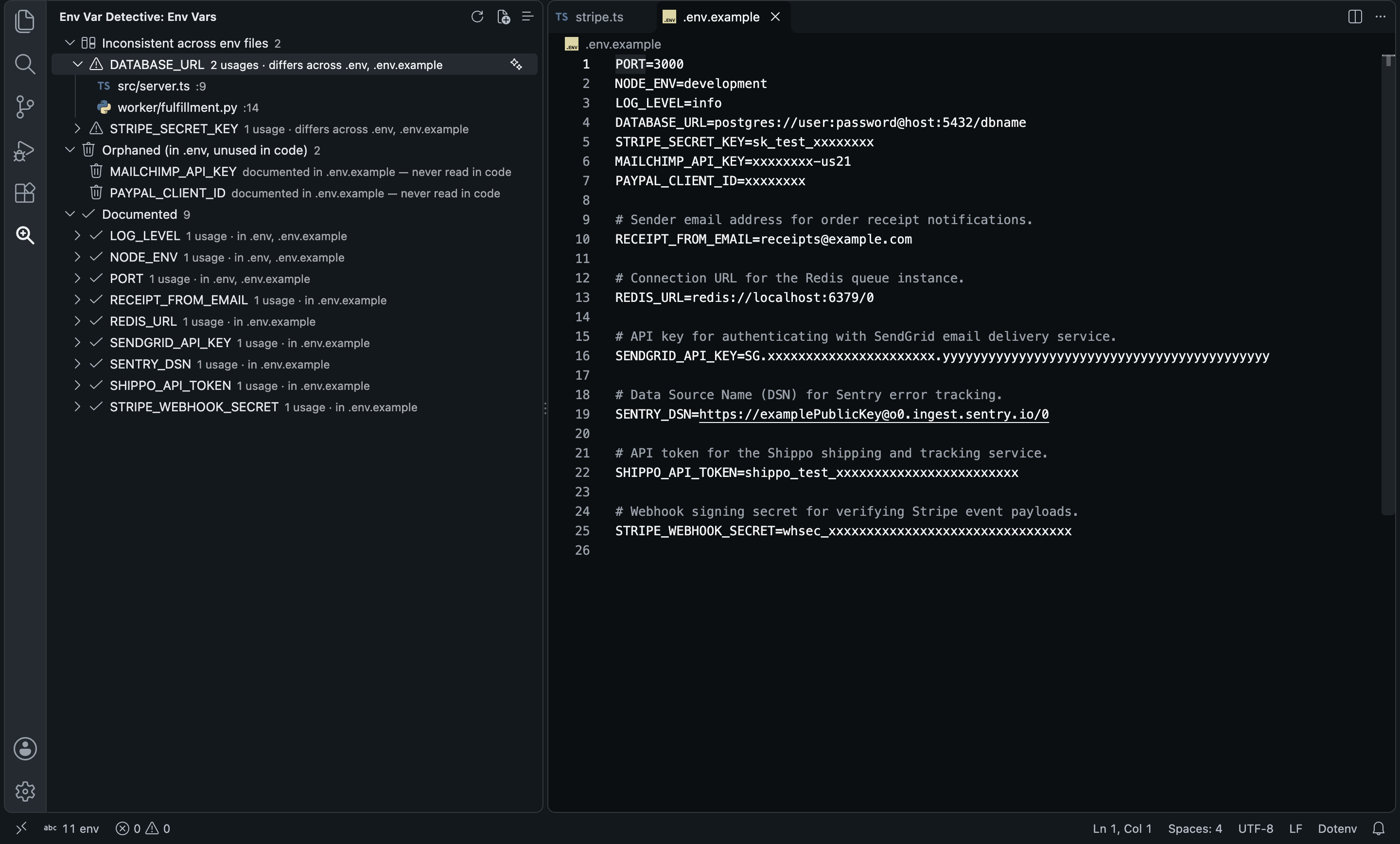
Six undocumented vars become six commented entries
One click on Generate .env.example with AI, from the usage sites in a TypeScript API and a Python worker. Existing lines are never rewritten; new entries go at the end, only after you click Append. A real run:
What came out
And then
Every variable, sorted by what is wrong with it
Undocumented: read in code, in no env file. Inconsistent: in two or more env files with different values, the DATABASE_URL that means one thing locally and another in the file your teammates copy. Orphaned: defined, never read.
Everything in it
Reads the code, not just the .env
14 languages
process.env, import.meta.env, Bun.env, Deno.env.get, os.environ, os.getenv, Go, Ruby, Java, Rust, C# and more.
Every env file
.env, .env.example, .env.local, .env.development, .env.production, .env.staging, .env.test and more.
Four buckets
Undocumented, inconsistent, orphaned and documented, at a glance.
One click to the line
Every usage of every variable, a click away.
Docs written for you
One entry or every missing one, with a comment and a placeholder. Keys and secrets get obviously fake values.
A count in the status bar
"6/11 env" means 6 of 11 variables read in code are undocumented. Click to rescan.
Free and local scan
An OpenRouter key is only needed for the AI-written entries.
Never rewrites your file
It only appends to the example file, only when you click Append.
Before you choose
How it compares
Env Var Detective | DotENV | Dotenv Official | ENV | |
|---|---|---|---|---|
| Finds env vars read in your code | Yes | No | — | No |
| Undocumented / orphaned / inconsistent report | Yes | No | No | No |
| Writes .env.example with descriptions | Yes: AI | No | No | No |
| .env syntax highlighting | No | Yes | Yes | Yes |
| Works in Cursor and VSCodium (Open VSX) | Yes | Yes | Yes | — |
From each extension’s public listing. Something changed? Tell me at ciromaciel.click/contact.
Price
Free. No account, no trial, no nag screen.
Env Var Detective is free. The scan runs on your machine; only the AI-written entries use your own OpenRouter key.
Free
$0
- The whole scan, local, for good
- AI-written entries with your OpenRouter key, any model, pay per token
- No account with me, no telemetry
When you need the next thing
Shipping the app? Hoster publishes it with HTTPS and its environment variables, from the CLI or from your agent.
See Hoster, free for one siteOpen your next repo and see every env var it needs.
VS Code Marketplace · Open VSX for Cursor, VSCodium and Windsurf