Regex Whisperer · for VS Code, Cursor, VSCodium and Windsurf
Read any regex in plain English. Write one by describing it.
Select a pattern and get a summary, a token-by-token breakdown, the edge cases and strings that match and don’t. Or describe what you need and get the pattern in your flavor, with its examples run through the real JavaScript engine before you paste it.
VS Code Marketplace · Open VSX for Cursor, VSCodium and Windsurf
Why I built it
Regex is the canonical write-only code
Six months later I read my own pattern and had no idea what it did. And when I needed a new one, I lost twenty minutes on a website in another tab, pasting test strings by hand.
Both ends are easy for a language model. What I wanted was to do them without leaving the file. So Regex Whisperer does exactly two things, one key each: explain and build.
Ciro Cesar Maciel, who builds and maintains it
How it works
Two keys, two directions
1
Select
Select a regex in any file.
2
Explain
Cmd+Alt+R (Ctrl+Alt+R): summary, breakdown, edge cases, matches and non-matches.
3
Describe
Cmd+Alt+Shift+R and type what you need, in your words.
4
Paste
Get the pattern in your flavor, checked against its own examples in JavaScript.
See it in action
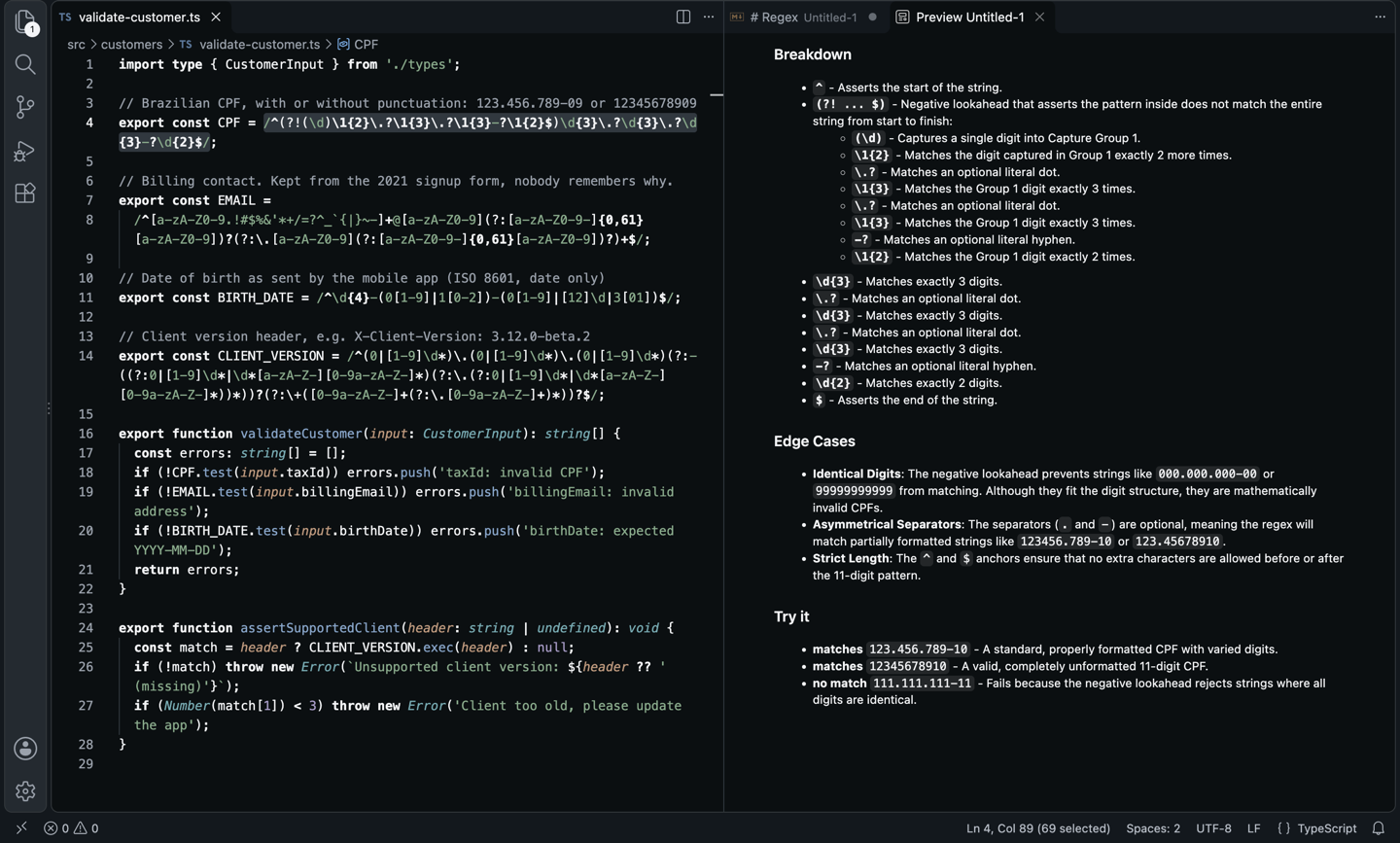
A validator nobody on the team wanted to touch, read back in plain English
One keystroke, and a real finding: the pattern happily accepts half-punctuated input like 123456.789-10. The line that went in, and part of what came out:
What went in
What came out
And then
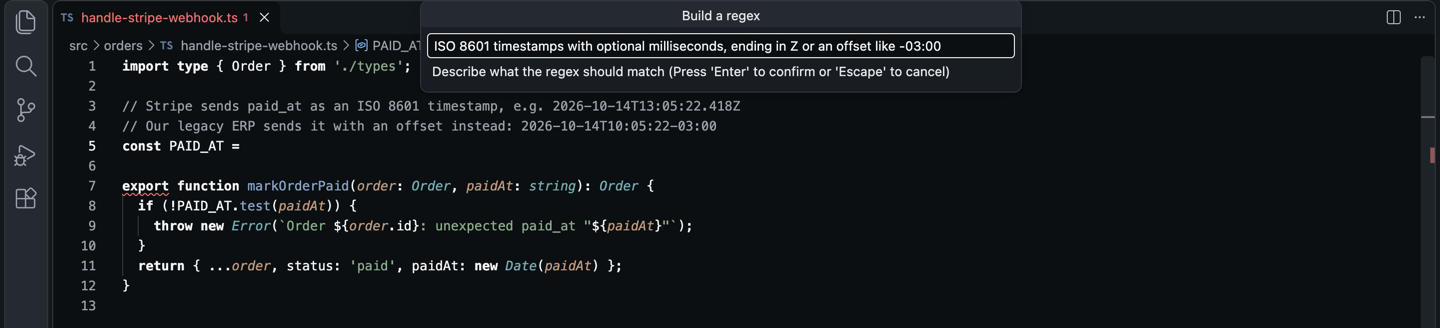
Describe the format, get the pattern where the constant goes
Describe the timestamp a webhook sends, right in the file, and get the pattern with its examples.
What went in
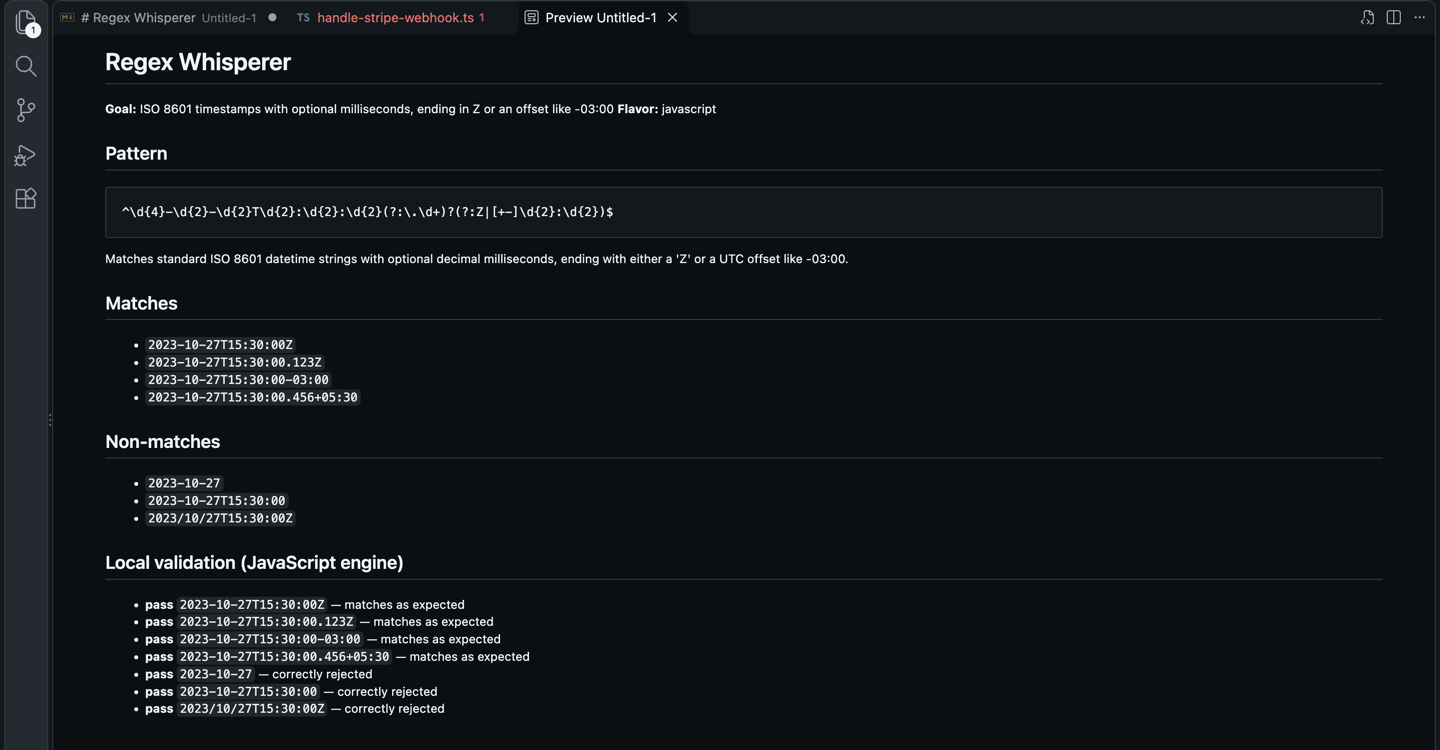
And then
Checked, not just generated
In JavaScript, the extension compiles the pattern with new RegExp and runs it against every match and non-match the model proposed. A wrong regex shows up before it reaches your code.
Everything in it
Both directions, in your editor
Explain and build
Most regex extensions only generate or only explain. This does both, one keybinding each.
Checked locally
JavaScript patterns run against the model’s own examples before you see them.
Seven flavors
JavaScript, PCRE, Python, Go, Java, Rust and .NET.
Edge cases named
What the pattern accepts that you did not mean, before it bites.
In your language
Explanations in English, Portuguese, Spanish or any other.
Insert at cursor
The bare pattern, ready for new RegExp, a config file or another language.
Your model
Any of the 350+ models on OpenRouter, pay per token, no subscription.
Nothing else leaves
Only the regex or your description goes out. No telemetry, no account with me.
Before you choose
How it compares
Regex Whisperer | Regex Previewer | Regexp Explain | regex101 (website) | |
|---|---|---|---|---|
| Explains a regex in plain English | Yes | No | Yes | Yes |
| Builds a regex from a description | Yes | No | No | No |
| Tests against examples | Partial: run locally for JS | Yes: your text | No | Yes: your text |
| Seven flavors | Yes | Partial | Partial | Yes |
| Inside the editor, one key | Yes | Yes | Yes | No: browser tab |
From each tool’s public listing. Something changed? Tell me at ciromaciel.click/contact.
Price
Free. No account, no trial, no nag screen.
Every feature is free. Where it uses AI, it uses your own OpenRouter key: you pick the model and pay the model, per token, with no subscription to me.
Free
$0
- Explain and build, for good
- Your OpenRouter key, any model, pay the model per token
- No account with me, no telemetry
Select the next regex you are afraid to touch.
VS Code Marketplace · Open VSX for Cursor, VSCodium and Windsurf