SQLite Editor · for VS Code, Cursor, VSCodium and Windsurf
Ask your SQLite database in plain English. Get SQL you can run.
Open any .db file inside your editor, read what it holds, edit it like a spreadsheet, and ask "which accounts owe us money?" instead of writing four joins by hand. When a query fails, it tells you why and hands you the fix.
VS Code Marketplace · Open VSX for Cursor, VSCodium and Windsurf
Why I built it
Every other SQLite editor still makes you write SQL by hand
I work with SQLite databases every day. Every time I wanted to ask a simple question of my own data, I bounced between a read-only browser and a SQL prompt. The viewers had no idea what the data meant. The query consoles had no idea what schema was in front of them.
So I built the database editor I wanted to use. It opens the file inside VS Code as a grid you can edit, and on top of that it reads the schema and a few sample rows, so the model talks about your tables, not tables in general.
Ciro Cesar Maciel, who builds and maintains it
How it works
From a .db file to the answer, without leaving the editor
1
Open
Click a .db, .sqlite or .sqlite3 file in the Explorer. It opens as a grid. No import, no separate app.
2
Read the briefing
One click and it tells you what the database is for, which tables matter and what looks odd in the samples.
3
Ask
Press Cmd+K (Ctrl+K) and type the question the way you would ask a colleague.
4
Review and run
The SQL comes back explained in one sentence. Nothing runs until you press Run.
See it in action
A question in plain English becomes SQL, and one click runs it
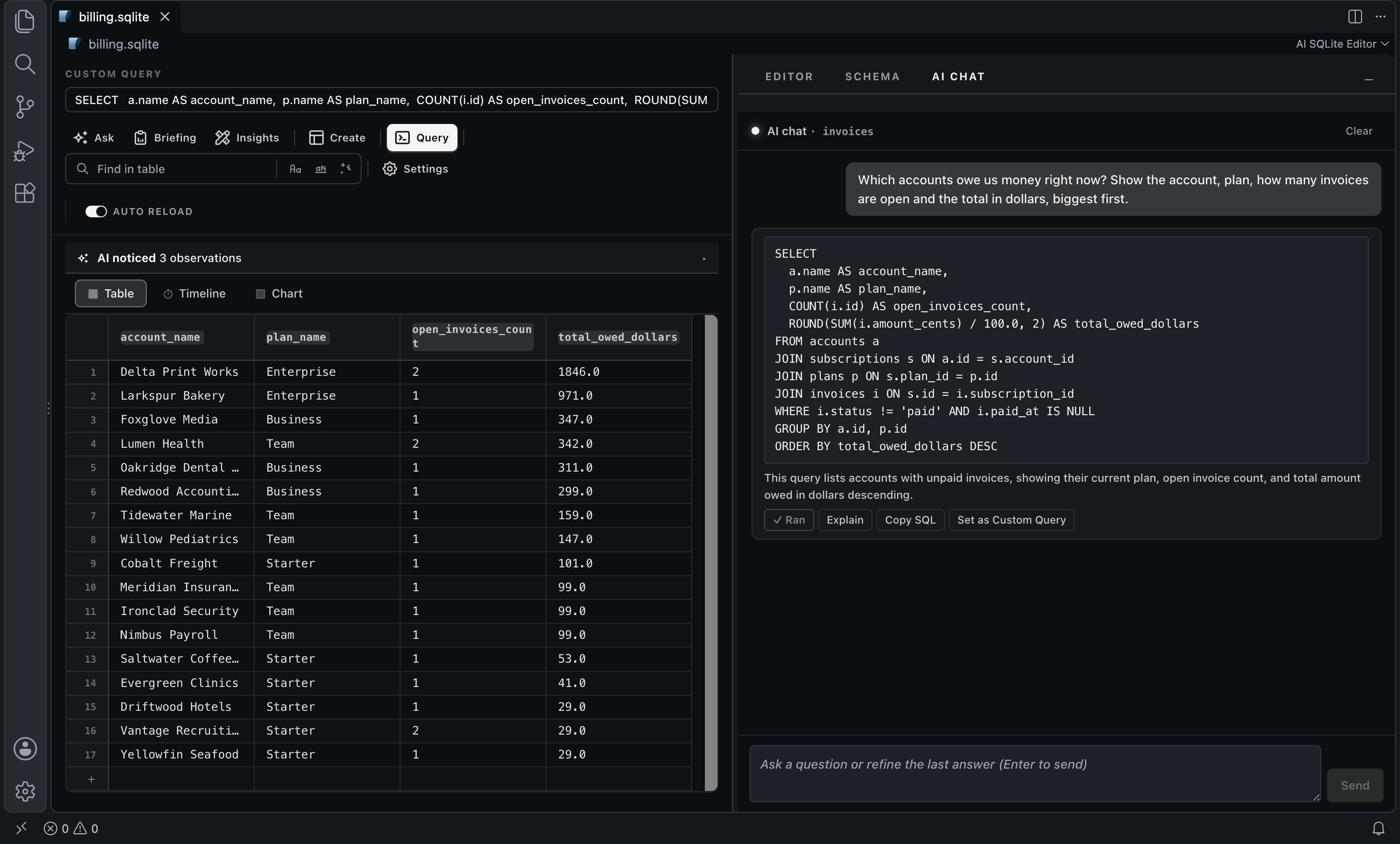
It knew the amount lives in amount_cents, that you need two joins to get from an invoice to an account, and that dollars means dividing by 100. A real run:
What went in
What came out
And then
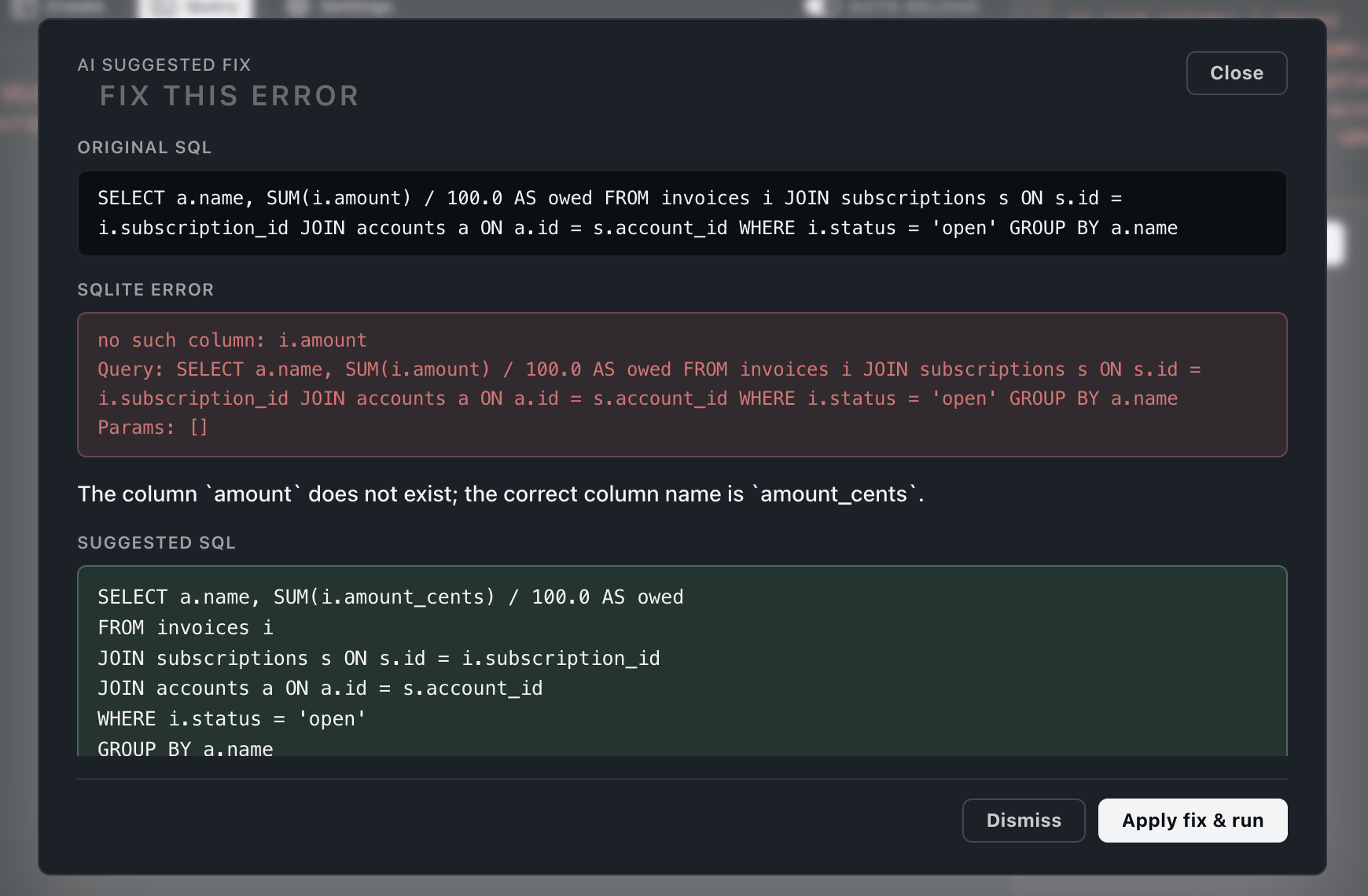
A failed query, the reason in one sentence, the fix ready to run
When SQLite says "no such column", it reads your schema and tells you which column you meant. Apply fix & run does the rest.
What went in
What came out
And then
Open a database you have never seen and understand it in a minute
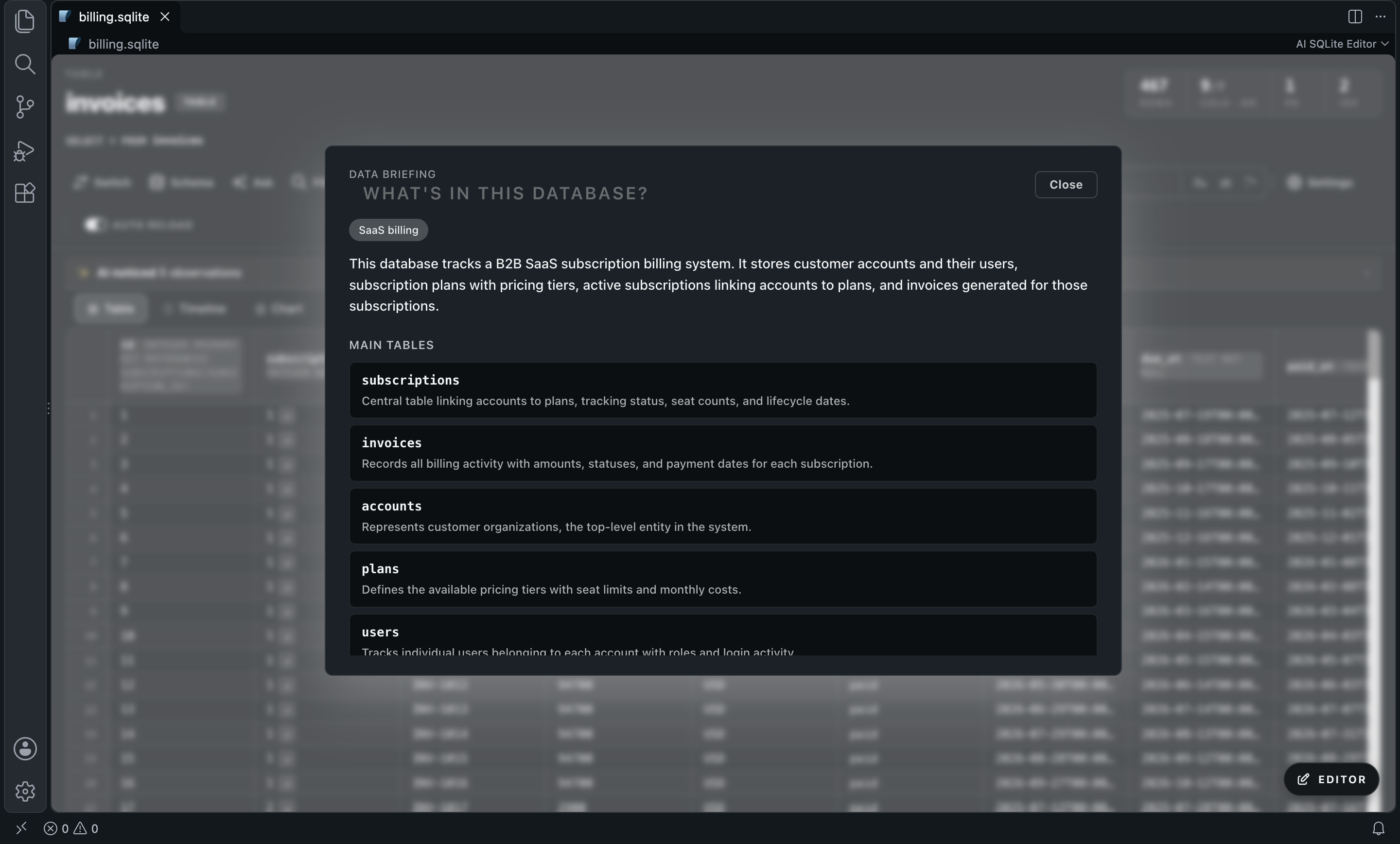
The Data Briefing reads the schema and samples and says, in plain English, what the database is for, which tables matter and why, and which questions you might want to ask. Click a question and it goes straight to the chat.
Everything in it
A full SQLite client, with the AI one click away
Edit like a spreadsheet
Browse tables, edit cells, insert and delete rows, alter tables, create indexes and run custom queries. Changes are written to the file.
Ask in plain English
The chat writes SQL against your real schema, explains it in one sentence and keeps the thread, so you can refine with follow-ups. Run, Explain, Copy SQL.
Errors explained and fixed
When a query fails, Ask AI to fix names the problem and proposes corrected SQL. Apply fix & run runs it.
Data Briefing
What the database is for, which tables matter, what looks odd, which questions to ask. One click.
Insights on every table
When you open a table, one scan flags anomalies, data-quality issues and patterns above the grid. You can turn it off.
Filter and edit by intent
AI Filter filters a table with a plain-English predicate. AI Edit transforms a column with an instruction like "trim whitespace", and you can undo it.
Schema Insights
Finds missing indexes on foreign-key columns, CHECK candidates and other structure smells, with the DDL to Apply or Copy.
Your model, or ours
Free: any model on OpenRouter with your own key, pay per token. Pro: the AI included, no account, no key.
Before you choose
How it compares
SQLite Editor | DB Browser for SQLite | DBeaver | SQLTools | |
|---|---|---|---|---|
| Open a .db inside VS Code | Yes | No: separate app | No: separate app | Partial: via driver |
| Inline row editing | Yes | Yes | Yes | No |
| Schema and structure management | Yes | Yes | Yes | Partial |
| Plain English to SQL | Yes | No | No | Partial: paid add-on |
| Schema-aware AI briefing | Yes | No | No | No |
| AI explanation of SQL errors | Yes | No | No | No |
From each tool’s public listing. Something changed? Tell me at ciromaciel.click/contact.
Free and Pro
Free does everything. Pro skips the AI account.
The free version keeps every feature, with your own OpenRouter key. Pro is for when you would rather not create one more account and paste one more key: the AI comes included.
Free
$0
- The whole editor: grid, edits, alter, indexes, queries
- Every AI feature with your own OpenRouter key, any model, pay per token
- The grid, the edits and the queries run on your machine
Pro
Every AI feature with no OpenRouter account and no key
One license key, any editor; it also unlocks Stack Trace Triage Pro if you subscribe to both
Claude Haiku 5.5, up to 50 AI requests a day
Loading the price…
Try it on the next .db file you open.
VS Code Marketplace · Open VSX for Cursor, VSCodium and Windsurf